Home /Bluetooth Thermal Label Printer for Barcodes and Multipurpose Labeling




Bluetooth Thermal Label Printer for Barcodes and Multipurpose Labeling
(5)
$55.43
Availability:
SKU: 244077982630
Specifications
Technology:Thermal
Max Input Sheet Capacity:100
Dual-sided Printing:No
Type:Label Printer
Color:White
Batteries:1 Lithium Polymer Batteries Required. (included)
Max Printspeed Monochrome:70 Ppm
Brand:Unbranded
Total Usb Ports:1
Specific Uses For Product:Home, Office, Inventory, Organization
Control Method:App
Additional Printer Functions:Print Only
gtin13:Does not apply
Printer Output:Monochrome
Series Number:220
Color Depth:1 Bits_per_pixel
Print Media:Labels
Printing Technology:Thermal
Duplex:Simplex
Controller Type:Ios, Android, Pc
Output Sheet Capacity:100
UPC:Does not apply
Hardware Interface:Bluetooth
Max Copy Speed (black & White):7 Ppm
Number Of Trays:1
Connectivity:Bluetooth
Sheet Size:0.78-3.14 Inches
Scanner Type:Portable
Wattage:2200 Milliamp_hours
Department:Girls
Special Feature:Lightweight, Inkless Printing, Compact
Printer Media Size Maximum:3.14 Inches
Connectivity Technology:Bluetooth, Usb-type-c
Item Weight:14.1 Ounces
Product Dimensions:2.47 X 4.69 X 4.92 Inches
Memory Storage Capacity:64 Gb
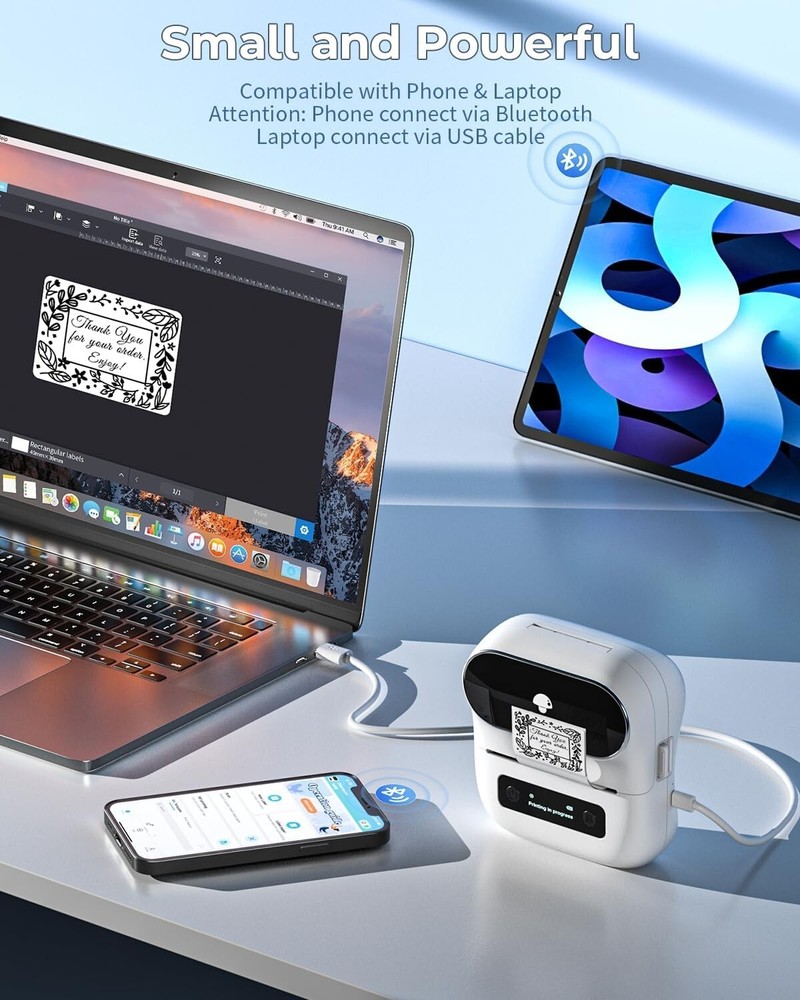
Label Maker, Barcode Printer, Bluetooth Thermal Label Printer, with Multiple Templates, Fonts, and Icons for Home, Kitchen, School, Office Organization Bluetooth Wireless Connectivity - Experience the freedom of wireless printing with the Bluetooth-enabled label maker. Easily connect via Bluetooth on the App "Print Master" with your , tablet for seamless label creation on-the-go. NOTE: The label maker only supports connection via Bluetooth with s and tablets on the App; laptop connection should be via USB Versatile Labeling Solutions - This all-in-one label maker and barcode printer is designed for various labeling needs, supporting print widths from 20mm to 80mm (''''). Print crisp and clear labels for organizing, ing, clothing, inventory, and more with the small label printer (Attention: Label Maker Can't Print 4 x 6 Shipping Labels) User-Friendly Interface - Simplify your labeling process with 's intuitive app, "Print Master". Create custom labels, barcodes, and tags with just a few taps, making the Bluetooth label maker printer the ultimate tool for efficiency. (The App offers over 100 fonts, 300 templates, and 1000 symbols for free use) Compatibility and Convenience: Designed to work with a wide range of devices, the portable label printer ensures you can print labels anytime, anywhere. Whether you're using a laptop or any mobile device, the label maker has got you covered. (The label maker is compatible with Windows, macOS, Linux, and Chromebook laptops/PCs, as well as Android and iOS s or tablets) High-Grade Printing - is a professional label maker manufacturer, specializing in thermal printers (including label makers, label printers, portable thermal label printers, and thermal paper). Depend on label maker for professional-grade labels. With sharp print resolution and durable adhesive, your labels will withstand the of time and Tablet Start Printing - Step 1: Download the App 'Print Master'. Step 2: Turn on the label maker and your 's or tablet's Bluetooth. Step 3: Click the 'Printer' icon in the App to search for the portable label printer, connect it via Bluetooth in the App, select the label size, and edit the content to start printing Laptop/PC Starts Printing - Step 1: Please check your laptop/PC's operating system (OS) and download and install the correct driver and the 'Labelife' app from the website. Step 2: Use the USB data cable to connect the label maker to your computer. Step 3: Select the label size, edit the content, and choose from the printer list
You May Also Like